In this blog post, I interview one of my good friends Kara Coleman, a fellow educator and mom who has started creating books and workbooks to help parents deal with the challenges of screentime, phone ownership, and building healthy technology habits with their kids. I’m excited to chat with her today in this guest post interview.
Kara and I go way back! After being in the same undergrad cohort for our Bachelors in Education, Kara and I ended up teaching at the same elementary school together for nine years. Kara taught 2nd and 3rd grades while I spent most of my time in 5th (with a few years in 4th when I looped with my students.)Â
Although we’ve both left the classroom, we’ve continued working together. Kara has been my virtual assistant behind the scenes at Tarheelstate Teacher for the past decade. Naturally, our work conversations often turn into conversations about our kids–and screen time is a topic that comes up a lot.
While my daughters are 19 and almost 8, Kara’s three children are 15, 12, and 9. With that span of ages, there’s always a kid in one of our houses who’s been through or currently going through whatever the others are about to experience.Â
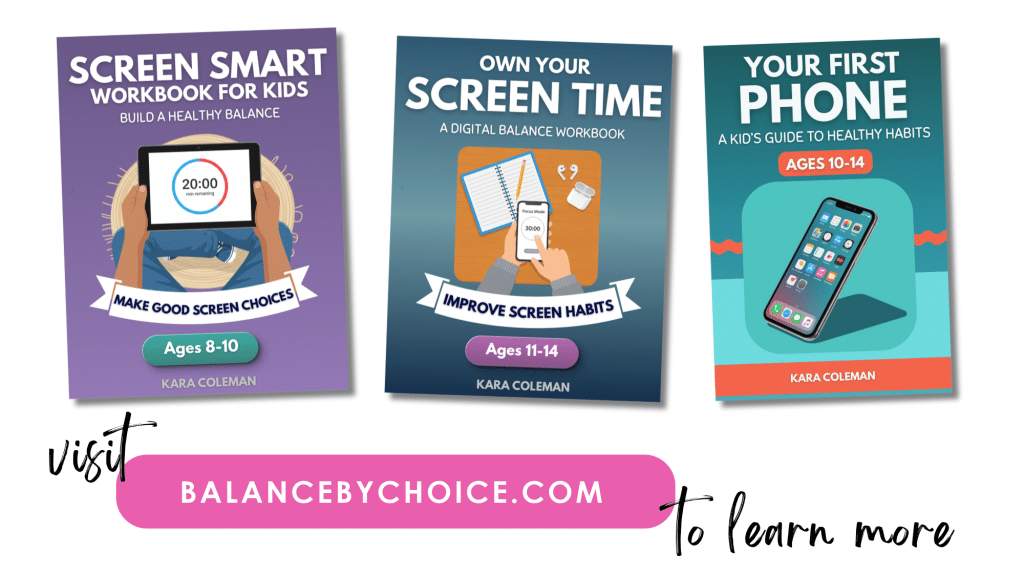
Last summer, Kara’s oldest was getting ready for his first smart phone. She wanted him to understand what he was getting into BEFORE handing over a phone, but she couldn’t find a resource that was actually written for kids. So, of course, she decided to create one for herself! Kara wrote Your First Phone, a guide and workbook to help kids build a healthy screen time balance.Â
That first resource has since grown into multiple workbooks and guides that help kids at different ages understand how screens and apps are designed to hold their attention–and how to build those healthy screen time habits.
I asked Kara to share a little more about why she created these resources, what using them has looked like in her own home, and how parents can start having these conversations with their kids.Â
Why did you want your son to work through something on his own instead of just talking through phone rules together?
Because a 14-year-old is much more willing to accept an idea when it does not come from his parents (or at least mine is ).
I could have just handed him the phone rules, but I knew if I did that it would be met with eye rolls and arguments. I also wanted him to understand how addictive phones can be and how much time, money, and research companies put into designing apps that keep teenagers like him attached to their phones. Me telling him that is not as powerful as him figuring it out on his own. And I knew the conversation about our family’s rules would go a lot more smoothly if he was already bought into the reasoning behind them.Â
So I went looking for that. There was plenty out there: research articles about why screen limits matter, parenting books and blog posts, long lists of tactics like turning the wi-fi off at a set time and keeping phones and screens out of bedrooms. I agreed with every bit of it and I was already doing most of it. All of it was written for me, though. None of it was written for him.
That is how Your First Phone started. It ended up being more of a guide than a workbook, because at 14 years old, my son was old enough to read through chapters explaining how phones and apps work, and think through reflection questions and activities at the end of each section. I gave the book to my son and told him that if he read it and took the reflective exercises seriously, I would be ready to talk about getting him a phone.Â
Once I finished creating Your First Phone, I realized how much I wanted something similar about screens in general for my younger two. So I created two more. Screen Smart for Kids is geared toward 8 to 10-year-olds and covers TV, tablet, and computer time. Own Your Screen Time is the same idea, aimed at healthy screen balance, geared toward 11 to 14-year-olds.
I love limits and think they are absolutely necessary to keep kids from slipping into an unhealthy relationship with screens. However, if kids don’t understand why those limits are necessary, the rules only work when you are there to enforce them. The moment you are not watching, or your kid is at a friend’s house, or on a school laptop, or a teenager who’s still awake after you’ve gone to bed, they go out the window. What I actually want is for my kids to want a healthy balance because they think it is good for them. Rules help them get there, but one day they will be off on their own.Â
I noticed that in the workbook, the kid writes their own screen time rules. I know that it's always been a classroom practice of mine to generate rules together, so it was interesting seeing that come into the home environment. How do you help kids get to the point that they can write the rules on their own?
The activities and reflective exercises in the workbook are designed to help kids think through their own screen time habits before they are asked to set any rules, and that is on purpose. Handing an 8-year-old a blank page and asking what they think is reasonable when it comes to screen time without any guidance probably won’t work well for most kids.
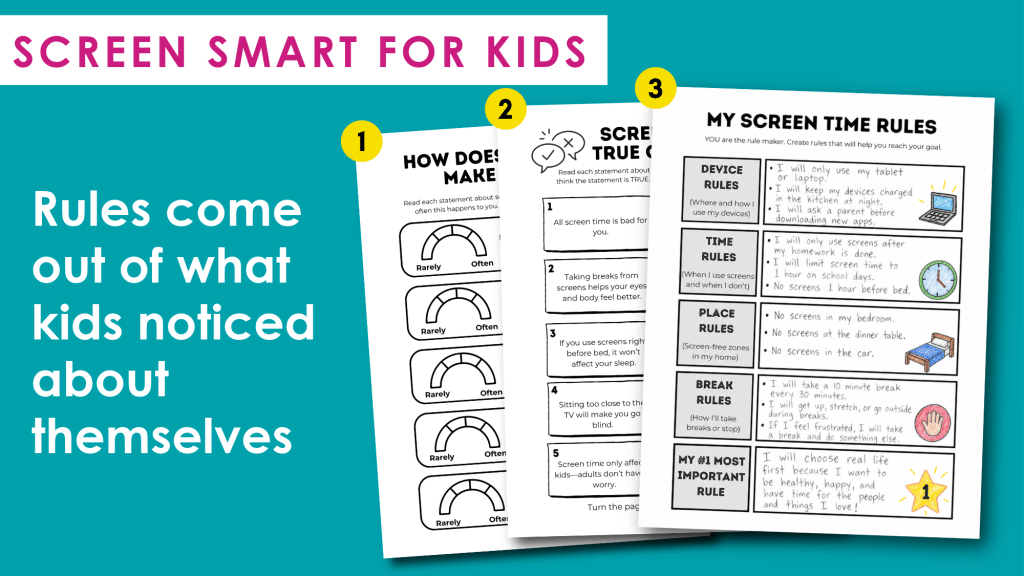
In Screen Smart for Kids, screen time goals aren’t even set until the third section. Before a kid gets there, they track one whole day hour by hour, write down what they were doing and on which device, add it all up, and answer whether or not the total number of hours spent on a screen was surprising to them. They shade in meters for statements like “I feel irritated or grumpy after screen time is over” and “I argue with family members about screen time.” They sort their own screen activities into categories, and they cut apart a page of situations and decide where screens are helpful, where it depends, and where they are not.Â
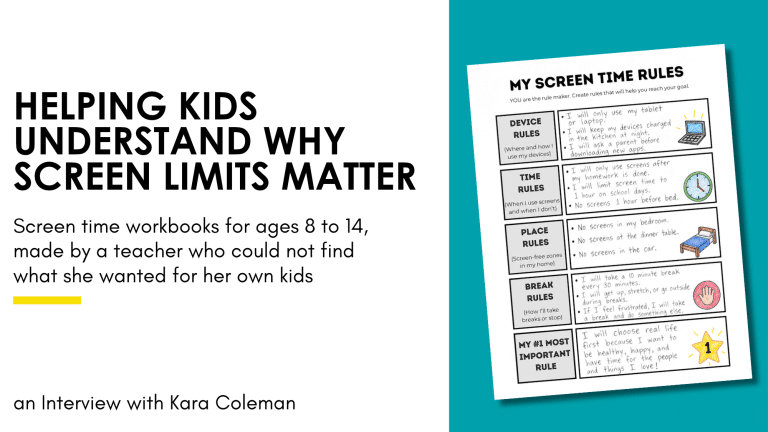
The rules page gives them five categories rather than an empty space: device rules, time rules, place rules, break rules, and finally their single most important rule. The page says “YOU are the rule maker,” and they are, but they are choosing those rules inside a structure, using everything they have just noticed about themselves. By the time they get to that page, the rules they come up with are often pretty close to what you would have set for them in the first place.
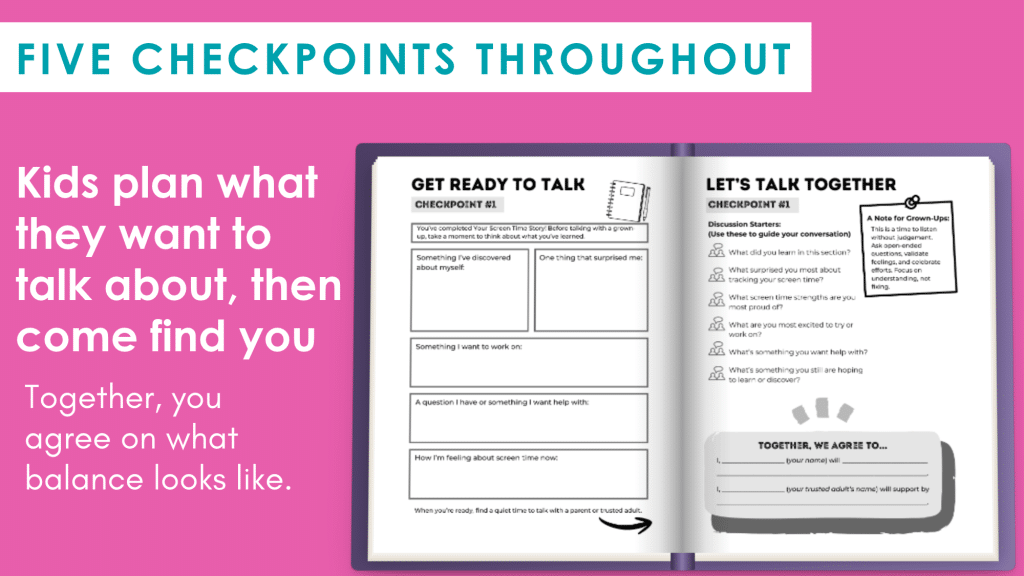
Five checkpoints are spread throughout the workbook. At each one the kid fills out a private reflection page first, then sits down with a parent. Each checkpoint includes discussion prompts that are intended to guide your conversation and end with a shared agreement where the parent and kid commit to supporting the plan. These are opportunities for you to let your kid lead, listen more than you talk or lecture (been there!), celebrate effort over perfection, and ask curious questions.
Let's be real for a minute. Most kids aren't going to be excited when their parents hand them a workbook about screen time! How do you get them interested?
You’re right. I knew the workbooks couldn’t feel like another lecture from a parent. The workbooks are designed to grab a kid’s attention right from the beginning and create a judgment-free zone for them to reflect on how screens impact them personally. I wanted kids to feel comfortable being honest about their own screen habits.
Screen Smart for Kids opens with five “Did You Know?” facts and a True/False quiz. Statements like “All screen time is bad for you,” “You can’t learn anything useful from video games,” and “Sitting too close to the TV will make you go blind” throw a lot of kids off, because they assume any parent handing them a workbook thinks those are true. When they turn to see the answers, they are often surprised to find those are false and their whole attitude toward the workbook shifts. They realize early on that the workbook’s message is not “screens are bad,” it’s “let’s learn how they work and why balance is healthy.”
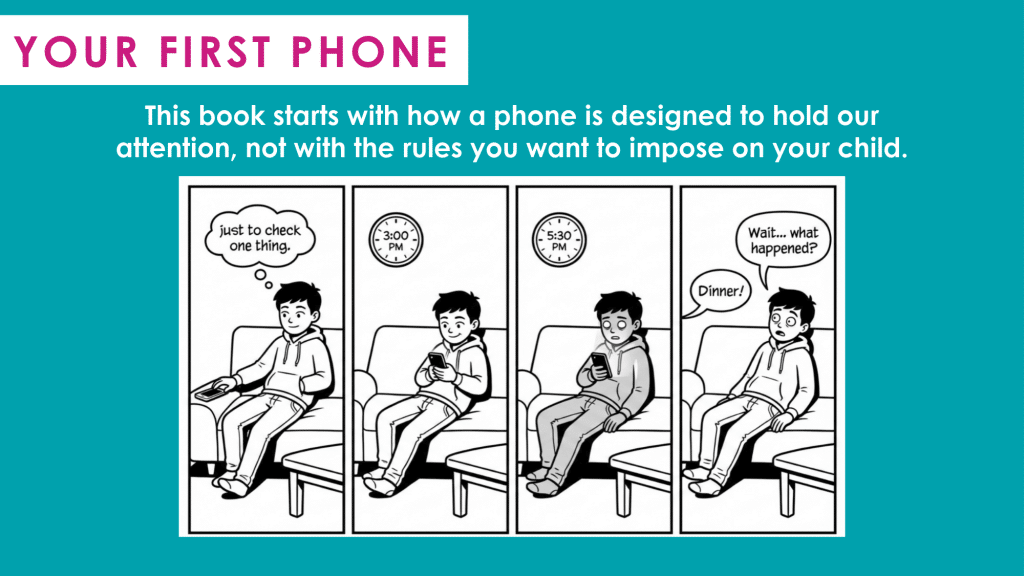
Own Your Screen Time and Your First Phone work the same way. They help kids understand what is happening behind the scenes with phones, apps, and all those tactics that are designed to keep us scrolling. Then they ask kids to turn reflect inward: what does all of that mean for me?Â
What changes have you noticed with screen time in your own home?
Several! My girls are diligent about setting a timer before they sit down to watch a show or get on a tablet. As soon as the timer goes off, the screen goes off, with no fuss and no reminder from me. The meltdowns when screen time ends are mostly gone. My 12-year-old treats cutting back as a challenge and will brag about how little she had over a weekend.Â
For my son’s phone, I have limits set up through family sharing and he rarely pushes back on them. When he wants more time on something, he asks reasonably and he takes the answer. Once in a while I do have to tell him to put the phone down, go outside, make plans with friends. I usually get an eye roll, but I can tell he agrees with me, and the phone goes away for a while.Â
Overall, there’s so much less pushback and conflict over negotiating screen time in our house. I wish I had approached it with this mindset way earlier on!
The first phone is a big decision. What do you wish more parents would do before giving their child their first phone?
I wish more parents would bring their kid into the part that comes before the rules. Sit down together and work out how the phone works: why free apps are free, what a notification is doing to a person’s attention, what an algorithm is choosing to show you and why it chose that. A kid who understands that a company is competing for their attention is a very different kid to set up a phone with.
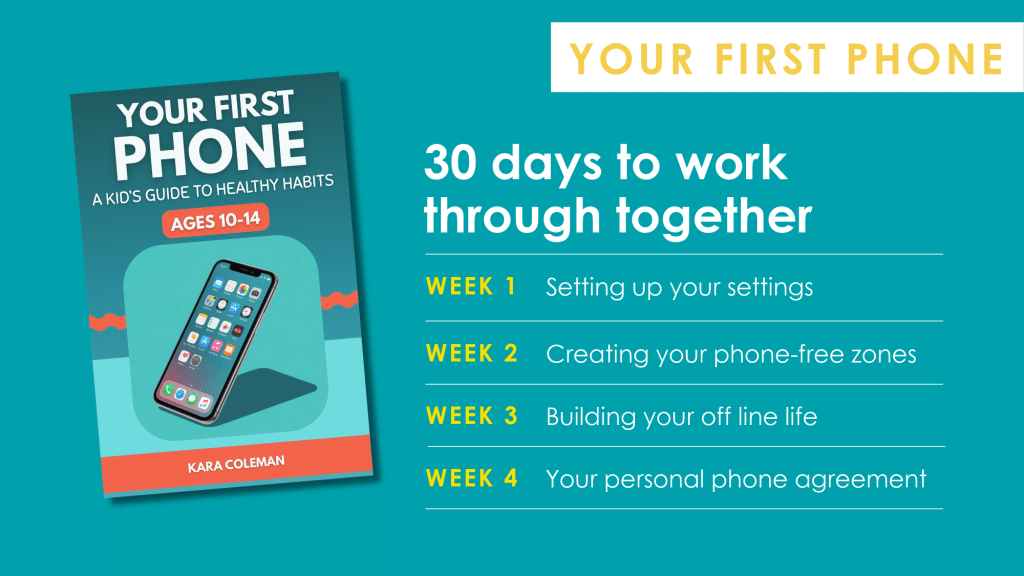
That is why Your First Phone is a 30 day setup rather than a list of rules. The first part is nothing but how phones and apps work. Then week one is going through the settings together, week two is deciding where the phone does not go, week three is protecting the parts of their life that have nothing to do with a phone, and week four is writing a phone agreement. I think taking your time in those first 30 days, before bad habits have had the chance to form, can make such a difference.
I also put together a free phone readiness quiz. Most of us decide based on an age or a grade, which makes sense, but it is worth looking at the screen habits a kid already has, and whether they are actually showing signs of being ready.
If a parent wanted to start this on their own, where would you tell them to begin?
Start talking to your kids about what is happening behind the screen, in the moment.
When you are watching TV together and an ad comes on, ask your kid who paid for that ad and what the company wants out of it. If a YouTube video ends and the next one starts on its own, point it out and ask why they think it does that. A game that gives them a reward for coming back tomorrow is worth asking about too, starting with why the reward is there at all.
And talk about what screens do to them, as information. Ask how they feel after an hour of scrolling compared to an hour outside, what happens to their sleep when a phone is in the room, and whether a heavy screen day changes their mood. Talk about your own screen habits as often as you can, so none of it sounds like a lecture. Letting them see you set limits on yourself does more than anything you tell them.
The whole point is that your kid understands why screen time balance is worth having, so they’ll make those choices for themselves, not just because you’re telling them to.
Explore Kara's Screen Time Resources
Kara has created five resources to help kids understand their screen habits and make healthier choices, with options for different ages and stages.
- Screen Smart for Kids (Ages 8–10): Helps younger kids think about their TV, tablet, and computer habits and begin setting their own screen time goals.
- Own Your Screen Time (Ages 11–14): Helps tweens understand how screens affect their daily lives and take more ownership of their screen time habits.
- Game Smart for Kids (Ages 8-12): Helps kids think about how gaming fits into their day, build healthy play habits, and stay safe when playing online.
- Behind the Bot (Ages 10-14): Helps tweens look behind the screen at how AI tools work, when to trust them, and how to use them wisely.
- Your First Phone: A guide for kids getting ready for their first phone, with activities and a 30-day plan for developing healthy phone habits.
Kara also has a free Phone Readiness Quiz to help parents think through whether their child is ready for their first phone.
Thanks for sharing with us, Kara. I know I’ll be using that phone readiness quiz myself before too long.Â
If you’re looking for more ways to help your kids understand screen time limits (instead of just arguing about them!), you can check find Kara at balancebychoice.com.